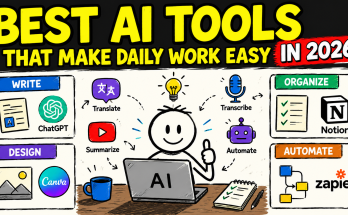
Not long ago, “using AI” meant knowing how to code, understanding machine learning models, or hiring a developer to build something custom. That is no longer true. Today, anyone — a student, a small business owner, a freelancer, or an office employee — can use AI tools to save hours every week, without writing a single line of code.
This shift matters because productivity used to be tied to technical ability. The person who could build a spreadsheet macro, write a script, or set up automation had an edge. Now, AI tools have flattened that gap. You no longer need to “know tech” to work smarter — you just need to know what to ask for.
This article breaks down exactly how non-technical users can use AI tools to boost productivity, which tools are worth trying, and how to get started without feeling overwhelmed.
Why AI Tools Are a Game-Changer for Non-Technical Users
Traditional software required you to learn its interface, memorize commands, or follow rigid workflows. AI tools work differently — most of them respond to plain, everyday language.
Instead of learning a formula, you simply type: “Summarize this document in three bullet points.” Instead of learning video editing software, you say: “Cut this video into short clips for social media.” The tool does the technical work; you just describe the outcome you want.
This is the core reason AI has become so accessible so quickly. It removes the steepest part of the learning curve — the technical layer — and replaces it with natural conversation.
Key Ways AI Tools Improve Productivity
1. Writing and Communication
One of the most common productivity drains is writing — emails, reports, proposals, social media captions, or documentation. AI writing tools can:
- Draft an email in seconds based on a short instruction
- Rewrite a clumsy paragraph into clear, professional language
- Summarize long documents or meeting notes into key takeaways
- Adjust tone (formal, casual, persuasive) without rewriting from scratch
Instead of staring at a blank page for twenty minutes, you can generate a first draft instantly and simply edit it to match your voice. This alone can save hours per week for people who write regularly as part of their job.
2. Organizing and Managing Information
Non-technical users often struggle with messy notes, scattered files, or unstructured data. AI tools can:
- Turn rough meeting notes into a clean action-item list
- Extract key details from a long PDF or contract
- Convert a messy list of information into a structured table
- Answer questions about a document instead of making you read the whole thing
This is especially useful for people who deal with large volumes of information but don’t have the time (or patience) to organize it manually.
3. Research and Learning
Instead of scrolling through ten different websites to answer one question, AI tools can pull together an explanation, compare options, or summarize a topic directly. This is useful for:
- Quickly understanding an unfamiliar topic before a meeting
- Comparing products, services, or strategies
- Getting a simplified explanation of something technical (like a contract clause or a financial term)
This doesn’t replace deep research when accuracy is critical, but for everyday decision-making, it dramatically cuts down research time.
4. Automating Repetitive Tasks
Many AI-powered platforms now offer no-code automation — meaning you can connect apps and automate repetitive tasks using a visual interface instead of writing code. Examples include:
- Automatically sorting and replying to common types of emails
- Creating a task in a project management tool whenever a specific type of message is received
- Generating a weekly summary report from your calendar or task list automatically
These automations used to require a developer. Now, they can often be set up with drag-and-drop tools guided by plain instructions.
5. Creating Visual and Presentation Content
Non-designers can now create decent-looking presentations, graphics, and basic visuals using AI-assisted tools. Instead of learning design software, users can:
- Turn a rough outline into a formatted slide deck
- Generate simple graphics or social media visuals from a text description
- Clean up formatting in documents automatically
This is particularly valuable for small business owners and freelancers who need to look professional without hiring a designer for every task.
6. Customer Support and Communication at Scale
Small business owners and solo entrepreneurs often lose time answering repetitive customer questions. AI chat tools can:
- Draft consistent, ready-to-send responses to common inquiries
- Summarize customer feedback trends from reviews or messages
- Help maintain a polite, professional tone even when replying quickly
This means one person can handle a workload that previously required a small team.
How to Start Using AI Tools Without Technical Knowledge
You don’t need a strategy document to begin — you need one small habit. Here’s a simple path:
- Pick one recurring task that takes up noticeable time each week (writing emails, summarizing notes, creating reports).
- Describe the outcome, not the process. Instead of thinking “how do I do this technically,” just describe what result you want in plain language.
- Start with templates or examples. Many AI tools work best when you give them an example of the tone or format you want.
- Review, don’t blindly trust. AI output is a draft, not a final answer — especially for facts, numbers, or anything sent externally. Always review before sending or publishing.
- Build the habit gradually. Add one new use case every week instead of trying to overhaul your entire workflow at once.
The biggest mistake non-technical users make is assuming they need to “learn AI” the way they’d learn software. In reality, the skill that matters most is clear communication — being specific about what you want, providing context, and refining your request if the first result isn’t quite right.
Common Mistakes to Avoid
- Being too vague. A vague prompt like “write something” gives a vague result. Be specific about audience, tone, length, and purpose.
- Skipping the review step. AI tools can occasionally generate inaccurate information, so always fact-check anything important before using it.
- Trying to automate everything at once. Start small. One well-used tool is more valuable than five half-used ones.
- Ignoring data privacy. Avoid pasting sensitive personal, financial, or client data into tools unless you understand how that data is handled.
The Bigger Picture: Productivity Without a Learning Curve
The real shift AI has brought isn’t just speed — it’s accessibility. Tasks that once required specialized skills (writing well, organizing data, designing visuals, automating workflows) are now available to anyone willing to describe what they need in plain words.
This doesn’t mean technical skills are useless — they still matter for advanced or highly customized work. But for the everyday productivity tasks that make up most of a workday — writing, summarizing, organizing, and communicating — AI tools have removed the technical barrier almost entirely.
Frequently Asked Questions
Do I need to learn prompt engineering to use AI tools effectively? Not really. Basic clarity — describing your goal, audience, and desired format — is usually enough. Advanced prompting techniques help, but they’re not required to get useful results.
Are AI tools reliable enough for work tasks? They’re reliable for drafts, summaries, and organizing information, but outputs should always be reviewed, especially for factual accuracy or anything shared externally.
Which AI tools are best for beginners? Start with general-purpose AI chat tools for writing and research, then explore specialized no-code automation platforms once you’re comfortable with the basics.
Can small business owners really replace technical hires with AI tools? For many day-to-day tasks — content creation, basic automation, customer replies — yes. For complex technical systems, a skilled professional is still valuable.
Final Thoughts
AI tools have changed what it means to be “productive” in a technical sense. You no longer need coding skills, design training, or advanced software knowledge to save time and work efficiently. What you need is the willingness to try, describe your goals clearly, and gradually build AI into your daily routine — one task at a time.